
Last updated on
Oct 31, 2026

TX Public Utility Commission Lifeline Household Worksheet 2015-2026 free printable template
pdfFiller is not affiliated with any government organization

Fill out
Complete the form online in a simple drag-and-drop editor.

eSign
Add your legally binding signature or send the form for signing.

Share
Share the form via a link, letting anyone fill it out from any device.

Export
Download, print, email, or move the form to your cloud storage.
Why pdfFiller is the best tool for your documents and forms


End-to-end document management
From editing and signing to collaboration and tracking, pdfFiller has everything you need to get your documents done quickly and efficiently.
Accessible from anywhere
pdfFiller is fully cloud-based. This means you can edit, sign, and share documents from anywhere using your computer, smartphone, or tablet.
Secure and compliant
pdfFiller lets you securely manage documents following global laws like ESIGN, CCPA, and GDPR. It's also HIPAA and SOC 2 compliant.
What is TX Public Utility Commission Lifeline Household Worksheet
The Lifeline Household Worksheet is a government form used by low-income households to determine eligibility for the Lifeline Program, which offers discounted phone or internet services.
pdfFiller scores top ratings on review platforms




Who needs TX Public Utility Commission Lifeline Household Worksheet?
Explore how professionals across industries use pdfFiller.

TX Public Utility Commission Lifeline Household Worksheet is needed by:
-
Low-income individuals
-
Families applying for the Lifeline Program
-
Households seeking discounted communication services
-
Social workers assisting clients with applications
-
Nonprofit organizations aiding low-income families
-
Community service providers supporting digital inclusion
Comprehensive Guide to TX Public Utility Commission Lifeline Household Worksheet
What is the Lifeline Household Worksheet?
The Lifeline Household Worksheet is a crucial document that helps individuals determine their eligibility for the Lifeline Program, which aims to provide discounted phone or internet services to low-income households. This worksheet asks for essential personal information and questions regarding the household's current Lifeline service status. Accurately filling out this form is significant for confirming eligibility for low-income phone services.
Purpose and Benefits of the Lifeline Household Worksheet
This worksheet is vital for applicants as it streamlines the process of applying for discounted services. By using the Lifeline Household Worksheet, low-income households can effectively manage their applications and ensure they meet the necessary requirements for assistance. The worksheet also offers peace of mind by confirming eligibility through precise information entry, minimizing the chance of application errors.
Key Features of the Lifeline Household Worksheet
The Lifeline Household Worksheet includes several notable features designed to facilitate the application process. Applicants will find fillable fields requiring personal data such as name and address, along with eligibility questions in clear categories. Additionally, the form mandates a signature from the applicant, affirming that the provided information is accurate. Checkboxes and organized sections enhance navigation, ensuring a smoother experience in filling out the federal Lifeline form.
Eligibility Criteria for the Lifeline Household Worksheet
The eligibility criteria for the Lifeline Program depend on specific household income levels and participation in qualifying programs. To support their application, individuals must provide necessary documentation that proves their income status, which can involve income statements or benefit letters. Special attention must be given to various demographics, including seniors and disabled individuals, who may have different qualifications.
How to Fill Out the Lifeline Household Worksheet Online
Completing the Lifeline Household Worksheet online is straightforward. Applicants can access the form through pdfFiller and follow these steps:
-
Download the worksheet in PDF format.
-
Fill out each required field, including name, address, and eligibility questions.
-
Ensure all sensitive information is accurately provided.
-
Sign the form electronically for submission.
By ensuring accuracy at each step, applicants can significantly improve their chances of a successful application.
Common Mistakes and How to Avoid Them
Common errors when filling out the Lifeline Household Worksheet can lead to delays or rejections. Frequent mistakes include missing signatures or incorrect entries related to household income. To prevent these pitfalls, it is wise to double-check all entries and ensure the form is fully completed before submission. Assistance can be sought through available resources that guide applicants in correctly filling out the form.
Submission Methods for the Lifeline Household Worksheet
After completing the Lifeline Household Worksheet, applicants have various submission methods available to them. They can choose to submit the form online via pdfFiller or send it through standard mail. It is essential to keep track of submission deadlines to avoid any issues regarding eligibility. Additionally, applicants should confirm the receipt of their submitted documents to ensure processing begins.
What Happens After You Submit the Lifeline Household Worksheet?
Once the Lifeline Household Worksheet is submitted, applicants can expect a typical processing timeframe that may vary depending on specific circumstances. They have the option to check the status of their application online, providing transparency throughout the process. In case of approval or denial, the next steps will be clearly outlined, allowing applicants to understand their options and follow up as needed.
Security and Compliance for the Lifeline Household Worksheet
Security is paramount when handling sensitive personal information on the Lifeline Household Worksheet. pdfFiller employs robust security measures such as 256-bit encryption and compliance with both HIPAA and GDPR regulations. Protecting personal data during the application process is crucial, and the platform ensures that confidentiality is maintained throughout, reassuring applicants of the security of their information.
Empowering Your Application Journey with pdfFiller
By utilizing pdfFiller, users can simplify their experience when completing the Lifeline Household Worksheet. The platform allows for easy document management and form filling, ensuring users experience security and accessibility throughout the process. Start your application journey effectively with pdfFiller today.
How to fill out the TX Public Utility Commission Lifeline Household Worksheet
-
1.Start by accessing pdfFiller and search for the Lifeline Household Worksheet form in the template gallery.
-
2.Open the form within the pdfFiller interface, ensuring you have an account to edit the document.
-
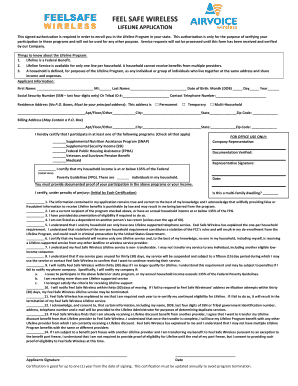
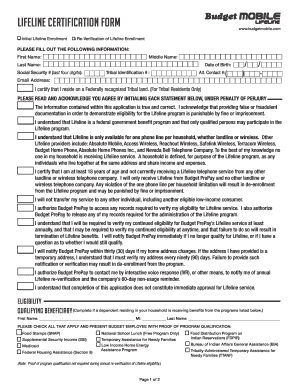
3.Familiarize yourself with the layout. The form includes fields for personal information such as first name, last name, address, and social security number.
-
4.Before filling out the form, gather all necessary documents, including personal identification and any previous Lifeline service records, to ensure accuracy.
-
5.Fill in each field step by step, carefully inputting your information. Use pdfFiller’s tools to easily navigate between fields and ensure you complete every required section.
-
6.Answer the eligibility questions presented in the checkboxes to provide a comprehensive overview of your household’s Lifeline status.
-
7.Once you've filled out the form, review all the entered information for any errors or missing sections. It’s crucial to ensure everything is correct.
-
8.Utilize the review tools offered by pdfFiller to highlight and double-check your responses.
-
9.After finalizing your entries, use the save option to keep a copy of your completed form on pdfFiller.
-
10.Download a PDF version of the filled form for your records and any other necessary submissions.
-
11.Lastly, follow the provided directions through pdfFiller to either submit electronically or print the form for mailing, ensuring it reaches the appropriate Lifeline Program office.

What are the eligibility requirements for the Lifeline Program?
To qualify for the Lifeline Program, applicants must demonstrate that their household income is at or below 135% of the federal poverty guidelines or participate in a qualifying federal assistance program.
Are there any deadlines for submitting the Lifeline Household Worksheet?
While there are no strict deadlines for the Lifeline Worksheet itself, it should be submitted promptly to prevent disruption in services. Always check for specific deadlines if applying for assistance during promotional periods.
How do I submit the Lifeline Household Worksheet once completed?
You can submit the completed Lifeline Household Worksheet by following the submission guidelines provided on pdfFiller. You can either submit it electronically via the platform or print and mail it to the designated Lifeline Program office.
What documents do I need to support my application?
Supporting documents may include proof of income, identification, and any previous Lifeline service history. Ensure all documents are up-to-date and clear to facilitate the review process.
What are common mistakes to avoid when filling out the Lifeline Worksheet?
Common mistakes include missing required fields, entering incorrect information, and not reviewing the form prior to submission. Double-check your entries and required documentation before finalizing the application.
How long does it take for the Lifeline Program to process my application?
Processing times for Lifeline applications can vary. Typically, you can expect a response within a few weeks. It's best to follow up if you do not hear back in that timeframe.
Is the Lifeline Household Worksheet form available in languages other than English?
The Lifeline Household Worksheet is primarily available in English. However, check with local service providers or the Lifeline program's website, as translations may be available in certain areas.
Related Forms






Get the latest insights from our blog


If you believe that this page should be taken down, please follow our DMCA take down process
here
.
This form may include fields for payment information. Data entered in these fields is not covered by PCI DSS compliance.